Load Detection
Slamcore Aware can be integrated with third party load detection sensors via Bluetooth LE, providing loading condition (loaded/unloaded) information through the web interface, WebSocket API and VDA5050.
Supported Sensors
Whilst some of the supported sensors may provide additional vehicle information, Slamcore Aware only reads and re-transmits information on load detection / condition.
| Sensor Name | Description |
|---|---|
| SLOC Productivity | Compact wireless device that can be mounted on the fork of material handling vehicles to provide information on the vehicle state, such as loading condition, driving state, etc. For more details refer to SLOC Productivity website. Slamcore supports the SPR-200, SPR-203, SPR-300+ and SPR303+ sensors. |
Pairing With Sensors
To use a supported sensor, pairing with the Slamcore Aware device must
first be configured through the web interface. Visit the
 Settings > Accessories page, enable the
desired sensor and enter the required information for the sensor, then
press SAVE CHANGES. The Slamcore Aware device will automatically
pair with the sensor if it is powered on and available. See further
below for details on how to verify the sensor pairing was successful.
Settings > Accessories page, enable the
desired sensor and enter the required information for the sensor, then
press SAVE CHANGES. The Slamcore Aware device will automatically
pair with the sensor if it is powered on and available. See further
below for details on how to verify the sensor pairing was successful.
SLOC Productivity Required Information
The following fields must be filled in to pair with the SLOC Productivity sensor.
| Required | Description |
|---|---|
| MAC Address | MAC Address of the SLOC Productivity device from which Slamcore Aware should accept load condition readings. The address can be found on the sticker affixed on the device. |
Load Detection on the Web Interface
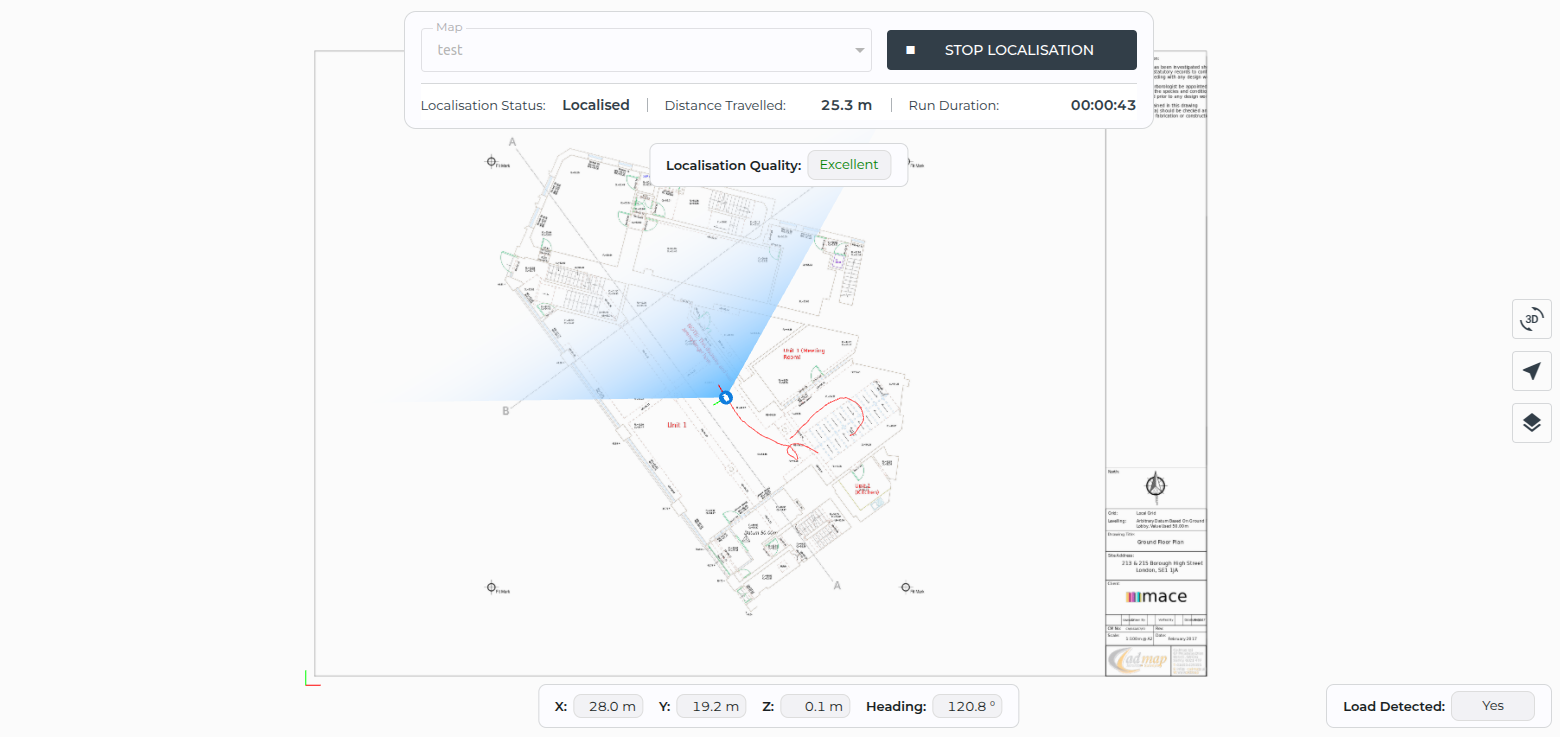
When Slamcore Aware is paired with a load detection sensor, the load
condition is indicated in the bottom right corner of the
 Positioning page (for both Localisation
and Mapping runs). This readout will only be shown if a sensor has
been paired successfully. The possible readout values are shown in the
table below.
Positioning page (for both Localisation
and Mapping runs). This readout will only be shown if a sensor has
been paired successfully. The possible readout values are shown in the
table below.
| Value | Details |
|---|---|
| Unknown | The paired device is not transmitting information. |
| Yes | Load is detected on the vehicle, as reported by the paired sensor. |
| No | No load is detected on the vehicle, as reported by the paired sensor. |
Load Detection via the Slamcore Aware APIs
When Slamcore Aware is paired with a load detection sensor, and the sensor is actively transmitting information, the load condition is provided through the WebSocket API and VDA5050.
WebSocket API
The load condition is transmitted through the WebSocket API as part of
the FullPose message, load_detected field. See the WebSocket
API page for details. The possible
values for the load_detected field are shown in the table below.
| Value | Details |
|---|---|
| Undefined | Sensor pairing is not configured, or the paired device is not transmitting information. |
| True | Load is detected on the vehicle, as reported by the paired sensor. |
| False | No load is detected on the vehicle, as reported by the paired sensor. |
VDA5050
According to the VDA5050 standard the load condition can be provided
as part of the State
message,
loads field. The possible values for the loads field are shown in
the table below.
| Value | Details |
|---|---|
| Unavailable | Sensor pairing is not configured, or the paired device is not transmitting information. |
| [ { ... } ] | Array with a single Load object - Load is detected on the vehicle, as reported by the paired sensor. The content of the Load object is defined as { "loadPosition" : "distance: XXX mm" }. In this case, the loadPosition field is used to carry information on the detected distance from the sensor to the load, as the Load object does not contain a separate field for reporting distance from the sensor to the load. |
| [ ] | Empty Array - No load is detected on the vehicle, as reported by the paired sensor. |